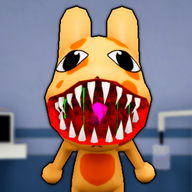
The Ultimate Animal Hospital Anomaly Beginner Guide: Survive Your First Shift
Master the reception desk in Roblox Animal Hospital with our comprehensive animal hospital anomaly beginner guide. Learn to spot and stop every threat.
Working the front desk in Roblox's spooky vet simulator can be terrifying, which is why you need a reliable animal hospital anomaly beginner guide to stay safe. As a new receptionist, keeping track of the strange entities trying to infiltrate your clinic is crucial for survival. This animal hospital anomaly beginner guide will walk you through everything you need to know to identify impostor patients, manage your sanity, and keep the hospital running smoothly.
In this environment, a simple mistake can lead to catastrophic consequences for both you and the legitimate animals under your care. By learning the specific tells of each entity, you can protect the hospital and survive the night.
Understanding Anomalies in Roblox Animal Hospital
Anomalies are deceptive entities that mimic the appearance of normal animal patients. Their goal is to trick you into admitting them through the front desk check-in window. If you fail to identify them and allow them inside, they will cause severe disruptions.
According to player experience and in-game mechanics, admitting a fake patient can trigger a variety of negative events. These include draining your sanity, killing other patients inside the facility, or transforming into a highly aggressive, hostile monster known as a Skinwalker.
To help you navigate these threats, this animal hospital anomaly beginner guide categorizes the anomalies into three distinct groups based on how they are detected.
Appearance Anomalies: Spotting Threats at the Window
Appearance anomalies are the first line of defense you must manage. These anomalies can be spotted immediately at the check-in window without using any specialized equipment.
However, you must remain vigilant. While some physical mutations are glaringly obvious, others require you to slow down and observe the patient closely before making a decision.
Key Identification Tips
- Don't Rush: Community reports suggest that rushing through patients is the leading cause of admitting a Twitching anomaly. Take at least four to five seconds to observe each animal's idle animations.
- Check the Mouth: The Human Teeth anomaly is particularly easy to miss if you only focus on the eyes. Make it a habit to look at the jawline of every patient.
- Shutter Safety: The moment you spot a glaring physical mutation like Three Eyes or Hollow Face, close the shutters to deny entry safely.
Photo Anomalies: Developing the Truth
Some anomalies are clever enough to look completely normal in person. To catch them, you must take a photograph of the patient at the window and wait for the image to develop.
This mechanic introduces a unique risk: looking at a cursed photo before it has fully printed can cost you sanity. Always let the photo print completely before picking it up to inspect it.
Analyzing the Details
The Mismatched Ears anomaly is widely considered by the community to be one of the hardest anomalies to spot in the entire game. The difference can be incredibly subtle—sometimes only a slight change in ear curvature or a tiny size discrepancy. If the photo returns covered in grain or static, you do not need to look for specific visual changes; a Static Photo is always an automatic indicator of an anomaly.
CCTV Anomalies: The Camera Never Lies
CCTV anomalies are the most deceptive threats you will face. They pass both the physical eye test at the window and look perfectly normal in their developed photos. The only way to detect them is by checking the security monitor before allowing them through the gate.
Dealing with CCTV Threats
When dealing with CCTV anomalies, you must balance your attention between the desk and the monitor. The Skinwalker is the most dangerous CCTV anomaly. If you see this black, red-eyed figure on your screen, the camera feed will automatically zoom in. You must turn off the monitor immediately to prevent your sanity from draining rapidly.
Special Characters and Hospital Monsters
Not all threats arrive as standard patients at the check-in window. Some monsters roam the hospital halls, while other special characters will visit your window demanding items rather than admission.
Bed Monster
The Bed Monster manifests as long, black hands reaching out from underneath the hospital beds. A red danger zone will appear around the affected bed. If you or a patient step into this zone, the monster will drag you underneath. To safely banish the Bed Monster, you must feed it Maple Syrup.
Head Banger
The Head Banger is a disruptive entity that appears at your reception window and repeatedly slams its head against the glass. This behavior prevents you from closing your shutters. To deal with the Head Banger, you can either give it a cup of coffee to make it leave or wait it out, though waiting will cost you sanity.
Barney
Barney is a unique, non-hostile anomaly who does not ask to be admitted as a patient. Instead, he will ask you for favors, such as bringing him coffee. Meeting Barney's requests is highly beneficial, as helping him rewards you with a second coffee machine for your office.
Hostile Skinwalker
If you make a mistake and admit an anomaly, or if an admitted anomaly is left untreated within the hospital, it can transform into its hostile Skinwalker form. This monster will actively roam the halls, attacking both players and normal patients.
Step-by-Step Security Protocol for Beginners
To survive your shifts consistently, you should establish a strict routine for every patient that approaches your desk. Skipping steps is the easiest way to let a dangerous entity slip into the facility. Follow this standard operating procedure recommended by this animal hospital anomaly beginner guide:
- Perform the Visual Check: Look closely at the patient at your window. Check for extra eyes, human teeth, hollow sockets, or twitching animations.
- Take a Photograph: Click the camera button to snap a picture. Step back and wait for the photo to fully develop before picking it up.
- Compare the Photo: Check the developed photo against the patient standing in front of you. Look for mismatched ears, eyes, or general color changes.
- Check the CCTV Feed: Look at your security monitor. Cycle through the cameras to see if the patient is staring at the camera, distorted, or replaced by a black void.
- Take Action:
- If the patient is normal, open the shutters and admit them.
- If you identify an anomaly, close the shutters to turn them away.
- If an anomaly refuses to leave (like the Head Banger), use your taser for a sanity boost, or shoot them to neutralize the threat.
Frequently Asked Questions
Why is an animal hospital anomaly beginner guide necessary for new players?
Roblox Animal Hospital features multiple layers of anomaly detection, including visual checks, photo development, and CCTV monitoring. New players often struggle to manage these systems simultaneously, leading to sanity loss or monster attacks. A guide helps players establish a safe check-in routine.
Which anomaly is the hardest to spot?
According to player experience, the Mismatched Ears anomaly (found during photo or CCTV checks) is the hardest to spot because the difference in ear shape or size can be incredibly small and easy to overlook.
What happens if I let an anomaly into the hospital?
Admitting an anomaly can trigger a death ritual, spawn a hostile monster, or cause the patient to transform into a hostile Skinwalker that attacks players and other patients.
According to this animal hospital anomaly beginner guide, what should I do if the camera automatically zooms in on a Skinwalker?
You must turn off the security monitor immediately. The automatic zoom is designed to drain your sanity quickly, and shutting off the screen is the only way to prevent this damage.